In this post i will discuss about Log4J and Log files.
Log file is just simple file, which keep track of the record or event or info when any event happens or any software run. This whole process known as logging. We can create log file as simple log file.
Why Log file is required:
We can create log file for our simple script also so we can track or debug our script easily if anything goes wrong in script. For example, if our script is failing at some point then we can track back what went wrong
What is log4J
Log4j is free open source tool for creating log files It help us to generate log file.
Log4j is very lightweight and simple logging framework, comprising of three main components
Loggers
Appenders
Layouts
Download Log4J jar file.
1. Navigate to http://mvnrepository.com/
2. Search for Log4J
3. Download latest version of log4J


Create a Class file with below log levels:
logger.debug("Sample debug message");
logger.info("Sample info message");
logger.warn("Sample warn message");
logger.error("Sample error message");
logger.fatal("Sample fatal message");
Below is the sample code:
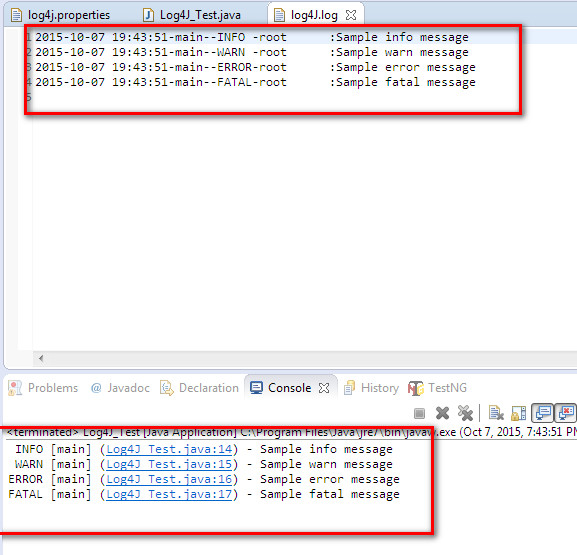
After executing test you can see logs in log4j.log file and in console as well.

OUTPUT of Log4J file:

Log file is just simple file, which keep track of the record or event or info when any event happens or any software run. This whole process known as logging. We can create log file as simple log file.
Why Log file is required:
We can create log file for our simple script also so we can track or debug our script easily if anything goes wrong in script. For example, if our script is failing at some point then we can track back what went wrong
What is log4J
Log4j is free open source tool for creating log files It help us to generate log file.
Log4j is very lightweight and simple logging framework, comprising of three main components
Loggers
Appenders
Layouts
Download Log4J jar file.
1. Navigate to http://mvnrepository.com/
2. Search for Log4J
3. Download latest version of log4J

Create a sample Java project and add log4J. jar file to project.
Create a properties file
Right click on Project --New --File
give a name log4j.properties.
and add below code in that file
Create a Class file with below log levels:
logger.debug("Sample debug message");
logger.info("Sample info message");
logger.warn("Sample warn message");
logger.error("Sample error message");
logger.fatal("Sample fatal message");
Below is the sample code:
After executing test you can see logs in log4j.log file and in console as well.
OUTPUT of Log4J file: